Margin vs Padding In CSS

8 views· 2:22· May 7, 2024

🛍️ Products Mentioned (2)

This video is summary for the article:- https://www.gyata.ai/css/css-margin-vs-padding/ Empowering Futures 🚀 Leveraging AI to provide world-class Ed-Tech solutions because learning never stops! 🧑‍💻#StayAheadOfAI 😀 Visit our website https://www.gyata.ai/ for better Learning Experience: 👨‍💻 Follow us Instagram:- https://www.instagram.com/gyata.ai/ Facebook:- https://www.facebook.com/gyataai/ Twitter:- https://twitter.com/GyataAi Linkedin:- https://www.linkedin.com/company/gyata-ai/ Your Queries:- Introduction to CSS Margin Vs Padding Understanding Margin and Padding Differences between Margin and Padding How to Use Margin and Padding Common Errors and How to Avoid Them Tips and Tricks #cssmargin #margin #csspadding #padding #marginvspadding #css #webdev #frontend #development #design #html #coding #webdesign #programmer #ui #csstips #webdevelopment #learncss #frontenddevelopment #beginner #webdevelopmenttutorial #learnwebdevelopment #csslayouts #responsivewebdesign #cssmagic #frontendengineer #webdevelopmentcourse #100daysofcode #buildinpublic #csslearning
About This Video

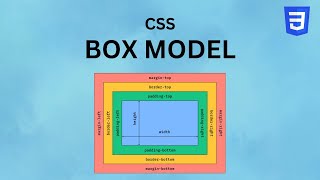
In this video, I break down one of the most common CSS layout confusions: margin vs padding. CSS controls the look and formatting of HTML, and these two properties are essential for creating clean spacing in your UI. I explain margin as the space around an element (outside the border) and padding as the space inside an element (inside the border) that pushes your content away from the edges. I also cover the key differences that actually matter when you’re building layouts: padding is included in an element’s background color, but margin isn’t. Margins can collapse (especially vertical margins), where the larger value wins when two margins meet—padding doesn’t collapse. Then I show how to use both with individual properties (top/right/bottom/left) and shorthand for cleaner code. Finally, I call out common mistakes like misunderstanding the box model (padding affects box size) and forgetting margin collapse, and I share practical fixes like using a CSS reset, using `box-sizing: border-box`, centering with `margin: auto`, and using padding or a border when you want to avoid collapse.

Frequently Asked Questions

🎬 More from Gyata AI