
NEW NotebookLM Mobile App 📚 First Look + Practical AI Workflows 📝
🛍️ Products Mentioned (21)
Recalibrating](
Wander my Digital Garden
[Recalibrating Newsletter Entry 1: What Recalibrating Means To Me](
My [Website](
My [Print Shop](
[Farcaster](
[Flipboard](
[Pinterest](
[Reddit](
The [Waking Up App](
[Obsidian](
[Adobe Suite](
[Welltory](
6. Camera [Sony A7iii](
7. Lens [Sony F2 28 mm](
8. Tripod [K&F Concept](
9. Main Lighting Neewer 660 PRO RGB
[What is Mindfulness](
[What is Burnout](
40% discount
9. Lighting [Ubeesize Ring Light](
Hi Friends, my name is Callum aka wanderloots. In today's video, I give a first look at NotebookLM's latest upgrade: the NotebookLM Mobile App 👀 This new app creates a simplified version of NotebookLM for your mobile device, giving you easier access to audio overviews (podcasts) & letting you share sources to NotebookLM directly from your phone. These features save you a ton of time and energy getting your notebook filled with useful sources📝💡 NotebookLM is a free & private AI tool that accepts up to 50 sources. Once you've discovered or uploaded sources, you can chat with them, prepare briefing docs/summaries, and even generate an Audio Overview where two AIs create a podcast about your uploaded sources & notes 🤯 The NotebookLM Mobile App helps streamline this process by allowing you to share sources to new & old notebooks so you can research on the go. The Mobile App is also now the best way to listen to audio overviews (AI podcast) since you can sync seamlessly between web & mobile. Getting the podcasts to my phone was always a problem for me, so I'm very glad they focused on improving this feature for the mobile app so I can listen & learn on the go. That said, there are a few limitations to the Mobile App, certain features are only present on the web version. In this video, I walk through my strategy for using both the web & mobile versions effectively so you can get the most out of NotebookLM. Anyone can benefit from this tool, including: students, researchers, knowledge workers, corporate workers, teams, content creators... really, anyone looking to learn anything! New ideas, surfacing insights, making connections, distilling complex information, there is no end to how AI can boost the notes you're already taking. I hope you enjoy! ✨ To learn more about the features of NotebookLM & how I integrate AI into my workflows, checkout my AI Learning Playlist: https://www.youtube.com/playlist?list=PLWhMzDKA7vJ7k0CCHAhCNGXH1BKKEo_we P.S. I greatly appreciate any feedback, please let me know what you think 😊 Join My Membership: https://www.youtube.com/channel/UCFiU1vIpPD3lQltke_18m3A/join 💌 Sign up for my [free newsletter: Recalibrating](https://paragraph.xyz/@wanderloots.eth?referrer=wanderloots.eth) 🧠 Join my [Hypersub Exclusive Membership ] (coming soon) 🏡 Wander my Digital Garden https://wanderloots.xyz 📰 Try Ground News For Research: 40% discount https://check.ground.news/wanderloots Timestamps: 00:00 Intro To The New NotebookLM Mobile App 01:02 Today's Outline & Goals 02:41 Brief Overview Of NotebookLM's Features 04:39 Latest NotebookLM Update: The Mobile App 05:55 First Look At The NotebookLM Mobile App 06:27 Audio Overview (AI Podcast) 08:03 Interactive Audio Overview (AI Podcast) 09:12 Exploring The NotebookLM Mobile App 09:28 Creating A New Notebook On Mobile 11:38 Adding More Sources 12:40 Comparing Web vs Mobile NotebookLM (Missing Features) 13:41 Discover Sources Feature 14:27 Mind Map Feature 16:26 Sharing Your Notebooks With Friends 17:49 Practical Workflows Between Mobile & Web 20:38 Next Steps & Ideas For Learning WATCH NEXT 🌱 Obsidian & Digital Gardens https://www.youtube.com/playlist?list=PLWhMzDKA7vJ7p50vW-oeZgKR2aDReZFW6 🧭 Recalibrating (Main Storyline) https://www.youtube.com/playlist?list=PLWhMzDKA7vJ4SLS2e6KiPmu9mku81B__Y 🎨The Creative Act (Art and Mindfulness) (coming soon) ✨ Mindfully Calming Timelapses https://www.youtube.com/playlist?list=PLWhMzDKA7vJ4i4WawiPx0MAqdE7E8kr7X LINKS (MY WORLD) 🧭 [Recalibrating Newsletter Home](https://paragraph.xyz/@wanderloots.eth?referrer=wanderloots.eth) 🏔️To start reading from the beginning: [Recalibrating Newsletter Entry 1: What Recalibrating Means To Me](https://wanderloots.substack.com/p/1-what-recalibrating-means-to-me) 🌍 My [Website](https://wanderloots.com/) 📸 My [Print Shop](https://wanderloots.darkroom.com/) ✨ 🧠 [What is Mindfulness](https://www.wanderloots.com/mindfulness)? 🔥 [What is Burnout](https://www.wanderloots.com/burnout) and How Can I Recover? SOCIALS 🟣 [Farcaster](https://warpcast.com/wanderloots.eth) 📸 [Instagram](https://www.instagram.com/_wanderloots/) 📰 [Flipboard](https://flipboard.com/@_wanderloots) 📍 [Pinterest](https://www.pinterest.ca/wanderloots/) 🤖 [Reddit](https://www.reddit.com/user/_wanderloots) MY FAVOURITE TOOLS 😴 🤯 The [Waking Up App](https://dynamic.wakingup.com/guestpass/SC4914439) (use this link for a 30 day free trial) 📝 [Obsidian](https://obsidian.md/) (decentralized note-taking) 📹 [Adobe Suite](https://prf.hn/l/lQ9DwpA) (general creativity) ❤️ [Welltory](https://app.welltory.com/payments/plans/main/?coupon=wanderloots) (Health Tracker) EQUIPMENT USED 6. Camera [Sony A7iii](https://amzn.to/3seSHv6) 7. Lens [Sony F2 28 mm](https://amzn.to/3TiWCT2) 8. Tripod [K&F Concept](https://amzn.to/3soCKCP) 9. Lighting [Ubeesize Ring Light](https://amzn.to/3GD02Zy) 10. Main Lighting Neewer 660 PRO RGB: https://amzn.to/3CEcU2V
🎬 More from Wanderloots
Obsidian Smart Plugin Workflow 📝 New Smart Connections + Context AI
7.6K views
How To Build LLM Wiki In Obsidian? 🧠 A Memory Layer For Any Agentic AI
33.5K views
Why Codex? 💡 Build Agentic Workspaces That Improve Over Time
5.9K views

Why LLM Wiki? 🧠 Future Of Knowledge For Agentic AI & Humans
82.7K views
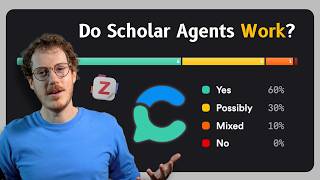
Academic Search Engine + Agentic AI 📚 Consensus & Zotero Deep Research
2.2K views
How To Stay Ahead In An AI World? 💡 Curating Knowledge With Recall Update
4.3K views