
Obsidian Smart Plugin Workflow 📝 New Smart Connections + Context AI
🛍️ Products Mentioned (19)
My Patreon
Smart Loop Info
Recalibrating](
Wander my Digital Garden
[Recalibrating Newsletter Entry 1: What Recalibrating Means To Me](
My [Website](
My [Print Shop](
[Farcaster](
[Flipboard](
[Pinterest](
[Reddit](
The [Waking Up App](
[Obsidian](
[Adobe Suite](
[Welltory](
6. Camera [Sony A7iii](
7. Lens [Sony F2 28 mm](
8. Tripod [K&F Concept](
9. Main Lighting Neewer 660 PRO RGB
How do we actually use our notes once we take them? How can we discover past insights so we can find & use them when we need them? In today's video, I walk through the updated Smart Plugins in Obsidian using the Smart Loop with Smart Connections, Smart Context, & Smart Chat: Discover, Bundle, Use✨ My Patreon: https://www.patreon.com/c/wanderloots Smart Loop Info: https://smartconnections.app/smart-loop/ With Smart Connections, a huge vault of thousands of notes isn't a burden, but is instead a repository of valuable context & insights, surfaced effortlessly. Smart Context makes keeps this context bundle automatically up to date, and Smart Chat lets you easily pass that context on to AI. The Smart Connections Plugin is a free & private AI tool that operates locally within Obsidian, with various features that leverage your existing note-taking through a local embeddings model (note: not an LLM). That means your data never leaves your computer. Smart Connections brings in "Semantic Searching" which is FAR more powerful than classic keyword searches. With the latest update, there is now a full suite of Smart Plugins in Obsidian that are all powered by the Smart Environment, a data layer that automatically updates as you make changes in your vault. This data layer keeps the context of your vault fresh and personalizes your interactions with the AI. The benefit of this data layer is that all of the Smart Plugins can share information without duplication. You can discover connections between notes, bundle it into reusable context, and then add it to your AI chats, while keeping track of your chat history in the note itself (which is incredibly helpful). In this video, I walk through how to get started with Smart Connections, Smart Context & Smart Chat. I use Smart Connections all the time to help me with my research and writing, surfacing insights and rediscovering notes I had forgotten about. I hope you enjoy! ✨ To learn more about how I organize my Obsidian vault with an eye to AI-integration, check out my PKM & Digital Gardening Obsidian Playlist here: https://www.youtube.com/playlist?list=PLWhMzDKA7vJ7p50vW-oeZgKR2aDReZFW6 P.S. I greatly appreciate any feedback, please let me know what you think 😊 Join My Membership: YouTube https://www.youtube.com/channel/UCFiU1vIpPD3lQltke_18m3A/join Patreon: https://www.patreon.com/c/wanderloots 💌 Sign up for my [free newsletter: Recalibrating](https://paragraph.xyz/@wanderloots.eth?referrer=wanderloots.eth) 🏡 Wander my Digital Garden https://wanderloots.xyz Timestamps: 00:00 Smart Plugins In Obsidian 01:00 The Smart Loop: Connections + Context + Chat 01:41 Step 1: Discovery With Smart Connections 02:45 Getting Started With Smart Connections 03:48 What Does Smart Connections Do? 05:17 Brief Smart Connections Demo 07:15 Project Demo (Part 1 Smart Connections) 09:18 Step 1: Bundling With Smart Context 09:39 Project Demo (Part 2 Smart Context) 11:26 Named Contexts: Reusable Bundles 12:34 Adding Named Context To A Project Note 13:02 Other Ways To Bundle Context 14:20 Using The Prepared Context 15:12 Using Context Scenario 1: Humans 17:11 Step 3: Smart Chat 17:42 Project Demo (Part 3 Smart Chat) 18:49 Using Context Scenario 2: AI Chats/Agents 20:03 Linking Chats To Notes 21:14 Adding Smart Context To Smart Chat 22:31 The Smart Loop Template & Obsidian Base 23:39 Other Smart Plugins 24:34 Smart Environment & Obsidian CLI (Future Feature) 25:04 Concluding Thoughts & Ideas LINKS (MY WORLD) 🧭 [Recalibrating Newsletter Home](https://paragraph.xyz/@wanderloots.eth?referrer=wanderloots.eth) 🏔️To start reading from the beginning: [Recalibrating Newsletter Entry 1: What Recalibrating Means To Me](https://wanderloots.substack.com/p/1-what-recalibrating-means-to-me) 🌍 My [Website](https://wanderloots.com/) 📸 My [Print Shop](https://wanderloots.darkroom.com/) ✨ SOCIALS 🟣 [Farcaster](https://warpcast.com/wanderloots.eth) 📸 [Instagram](https://www.instagram.com/_wanderloots/) 📰 [Flipboard](https://flipboard.com/@_wanderloots) 📍 [Pinterest](https://www.pinterest.ca/wanderloots/) 🐦 [X (Twitter)](https://twitter.com/_wanderloots) 🤖 [Reddit](https://www.reddit.com/user/_wanderloots) MY FAVOURITE TOOLS 😴 🤯 The [Waking Up App](https://dynamic.wakingup.com/guestpass/SC4914439) (use this link for a 30 day free trial) 📝 [Obsidian](https://obsidian.md/) (decentralized note-taking) 📹 [Adobe Suite](https://prf.hn/l/lQ9DwpA) (general creativity) ❤️ [Welltory](https://app.welltory.com/payments/plans/main/?coupon=wanderloots) (Health Tracker) EQUIPMENT USED 6. Camera [Sony A7iii](https://amzn.to/3seSHv6) 7. Lens [Sony F2 28 mm](https://amzn.to/3TiWCT2) 8. Tripod [K&F Concept](https://amzn.to/3soCKCP) 9. Main Lighting Neewer 660 PRO RGB: https://amzn.to/3CEcU2V
🎬 More from Wanderloots
How To Build LLM Wiki In Obsidian? 🧠 A Memory Layer For Any Agentic AI
33.5K views
Why Codex? 💡 Build Agentic Workspaces That Improve Over Time
5.9K views

Why LLM Wiki? 🧠 Future Of Knowledge For Agentic AI & Humans
82.7K views
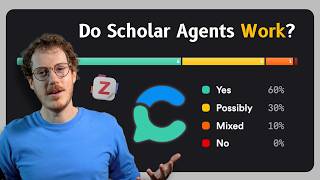
Academic Search Engine + Agentic AI 📚 Consensus & Zotero Deep Research
2.2K views

How To Stay Ahead In An AI World? 💡 Curating Knowledge With Recall Update
4.3K views
Vibe Design First THEN Build Apps 🎨 Full Google Stitch Tutorial + MCP Agentic AI
29.6K views