
Where do podcast trailers appear in the different apps? (Apple, Spotify, etc)
Learn how to create and publish podcast trailers that appear prominently in Apple Podcasts and Spotify. This step-by-step tutorial shows you exactly where trailers display across different podcast apps and how to set them up properly in your podcast hosting platform. In this video, you'll discover: - How to mark episodes as trailers in your podcast host - Where trailers appear in Apple Podcasts vs Spotify vs other apps - The strategic advantage of using trailers for podcast growth - How to backdate trailers without notifying current subscribers - Setting up seasonal trailers for multi-season podcasts Chapters: 0:00 - Introduction to Podcast Trailers 0:30 - How to Mark Episodes as Trailers 1:00 - Where Trailers Appear in Apple Podcasts 1:20 - Spotify Trailer Placement 1:45 - Trailer Display in Other Podcast Apps 2:20 - Why Trailers Are Essential for Growth 2:40 - How to Backdate Trailer Episodes 3:20 - Creating Seasonal Trailers 3:50 - Best Practices Summary Improve your podcast's discoverability and create compelling previews that convert browsers into subscribers. Whether you're launching a new podcast or optimizing an existing show, this guide covers everything you need to know about podcast trailers.
🎬 More from Transistor podcasting

How to claim your show on Apple Podcasts Connect
60 views

Upload a video podcast to Apple Podcasts, YouTube, Spotify, RSS (first look at Transistor hosting)
377 views
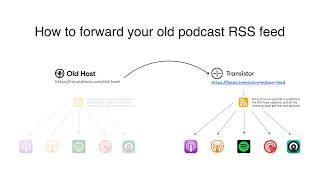
How to Redirect (Forward) Your Old Podcast RSS Feed When Switching Hosts
22 views

The history of video podcasts (Steve Jobs and Apple Podcasts) #videopodcast
1.2K views

How to Get Your Podcast on Spotify, Apple, YouTube & More (2026)
674 views

Create member-only podcasts with Ghost CMS and Transistor.fm
379 views