
Switch to a new podcast hosting service (without losing listeners)
🛍️ Products Mentioned (2)
If you're on Libsyn, Buzzsprout, Spotify for Podcasters (Anchor), or another hosting platform, you can migrate your podcast to a new hosting platform, without disrupting your show. Podcasters switch hosting providers for different reasons, maybe to get new features, better analytics, better customer support. In this video, I show you how you can switch your podcast to a new provider, migrate it, import it, and not lose any of your subscribers, which is usually the fear when you're switching from one provider to the other. 🔄 Switch to Transistor podcast hosting, and get 14 days free: https://transistor.fm/?via=youtube 00:00 Can you switch podcast hosting? 00:54 Step 1: find your RSS feed on your current hosting provider 01:18 Step 2: import (migrate) your podcast to your new hosting provider 03:09 Step 3: backup and export your old podcast analytics 03:32 Step 4: ensure all your MP3 files, show notes, etc imported correctly 03:57 Step 5: forward (301 redirect) your old RSS feed to your new RSS feed 05:58 You don't need to resubmit your podcast to Apple, Spotify, or YouTube! 07:13 Optional: how to update your RSS feed on Apple Podcasts 07:48 Optional: how to update your RSS feed on Spotify 08:10 Move to a new podcast hosting provider without worry or stress Read our full guide: "How to switch podcast hosting platforms without losing subscribers" https://transistor.fm/switching-podcast-hosting/
🎬 More from Transistor podcasting

How to claim your show on Apple Podcasts Connect
60 views

Upload a video podcast to Apple Podcasts, YouTube, Spotify, RSS (first look at Transistor hosting)
377 views
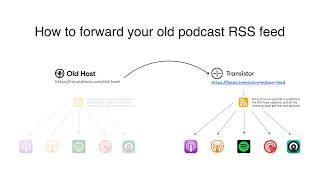
How to Redirect (Forward) Your Old Podcast RSS Feed When Switching Hosts
22 views

The history of video podcasts (Steve Jobs and Apple Podcasts) #videopodcast
1.2K views

How to Get Your Podcast on Spotify, Apple, YouTube & More (2026)
674 views

Create member-only podcasts with Ghost CMS and Transistor.fm
379 views