
Post your podcast to YouTube Podcasts (2023)
🛍️ Products Mentioned (2)
Learn how to start a YouTube podcast channel. YouTube has now rolled out its new podcast tab (visible in the main YouTube app, and in YouTube Music). You can now categorize any playlists on your YouTube channel as a podcast. 00:00 How to browse podcasts on YouTube 00:19 Open YouTube Studio 00:30 Select "Content" and then "Podcasts" 00:40 Create "New Podcast" for your YouTube channel 00:47 How to auto-post new podcast episodes to YouTube 01:01 Add podcast description and thumbnail to YouTube Podcasts 01:17 Add videos to your podcast playlist in YouTube 01:49 How podcasts appear in YouTube 02:10 Learn more about auto-posting your podcast to YouTube Learn more here: https://transistor.fm/features/youtube/?via=youtube Want to start a podcast? Read our guide: https://transistor.fm/how-to-start-a-podcast/?via=youtube
🎬 More from Transistor podcasting

How to claim your show on Apple Podcasts Connect
60 views

Upload a video podcast to Apple Podcasts, YouTube, Spotify, RSS (first look at Transistor hosting)
377 views
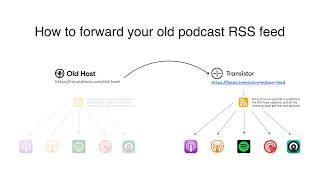
How to Redirect (Forward) Your Old Podcast RSS Feed When Switching Hosts
22 views

The history of video podcasts (Steve Jobs and Apple Podcasts) #videopodcast
1.2K views

How to Get Your Podcast on Spotify, Apple, YouTube & More (2026)
674 views

Create member-only podcasts with Ghost CMS and Transistor.fm
379 views