
Podcast cover art design – 3 free AI tools for generating artwork for Apple Podcasts & Spotify
🛍️ Products Mentioned (6)
Bing's Image Creator
PlaygroundAI
Transistor podcast preview
Try Transistor podcast hosting free for 14 days
Canva (cover art)
More information on starting a podcast
Want to make your podcast pop on Spotify and Apple Podcasts? In this video, I guide you through using three intuitive tools – Canva, Bing's image creator, and Playground AI – to create compelling podcast artwork without any design experience. Whether you're a beginner or an experienced podcaster looking to revamp your brand, this tutorial is for you! Don't forget to subscribe for more useful guides. 00:00 - Introduction – Importance of Eye-catching Podcast Artwork 00:09 - Tools for Generating Podcast Artwork 00:18 - Free Design Tools for Podcast Artwork 00:24 - First Tool: Using Canva for Podcast Artwork 01:39 - Image Format Requirements for Podcast Listening Apps 01:57 - Updating Podcast Artwork on your Hosting Platform 02:09 - Second Tool: Bing's Image Creator 03:02 - Combining Canva and Bing's Tool 03:25 - Using Canva's Background Removal Tool 04:02 - Third Tool: PlaygroundAI 🖥️ Three free tools for creating podcast cover artwork: - Canva: https://www.canva.com/ - Bing's Image Creator: https://www.bing.com/create - PlaygroundAI: https://playgroundai.com/ 📱 Free tool for comparing your podcast cover art to other podcasts: - Transistor podcast preview: https://transistor.fm/preview/# 📗 Read our guide on starting a podcast: https://transistor.fm/how-to-start-a-podcast/ 🎙️ Try Transistor podcast hosting free for 14 days: https://transistor.fm/?via=youtube
🎬 More from Transistor podcasting

How to claim your show on Apple Podcasts Connect
60 views

Upload a video podcast to Apple Podcasts, YouTube, Spotify, RSS (first look at Transistor hosting)
377 views
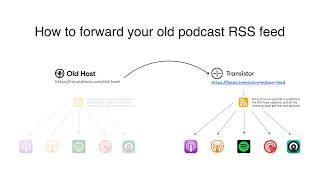
How to Redirect (Forward) Your Old Podcast RSS Feed When Switching Hosts
22 views

The history of video podcasts (Steve Jobs and Apple Podcasts) #videopodcast
1.2K views

How to Get Your Podcast on Spotify, Apple, YouTube & More (2026)
674 views

Create member-only podcasts with Ghost CMS and Transistor.fm
379 views