
How to Publish Private Podcasts on Spotify (Spotify Open Access Tutorial)
🛍️ Products Mentioned (1)
Finally, your listeners can listen to your private podcast directly on Spotify! If you run a members-only podcast, a premium feed, or an internal team podcast on Transistor, you can now use Spotify Open Access to distribute your content securely. In this video, Justin shows you how to enable the Spotify integration, invite subscribers, and what the experience looks like for the listener when they link their account. Timestamps: 00:00 - Intro: Private Podcasts on Spotify 00:52 - Enabling Spotify Open Access in Transistor 01:24 - Settings: Searchable vs. Hidden Feeds 02:01 - Previewing the Locked Content 02:22 - How to Add/Invite Subscribers 03:00 - The Listener Experience (Linking Account) 04:45 - What happens when you remove a subscriber? 05:33 - Example: Selling memberships with Ghost CMS 06:18 - Summary & How to Start PRIVATE PODCAST HOSTING WITH TRANSISTOR Transistor makes it simple to upload your podcast and distribute it everywhere people listen. Start as many shows as you want, get AI transcription, analytics, and a free podcast website—all in one place. Try Transistor free for 14 days: https://transistor.fm/?via=youtube
🎬 More from Transistor podcasting

How to claim your show on Apple Podcasts Connect
60 views

Upload a video podcast to Apple Podcasts, YouTube, Spotify, RSS (first look at Transistor hosting)
377 views
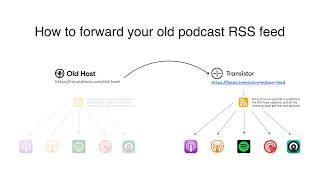
How to Redirect (Forward) Your Old Podcast RSS Feed When Switching Hosts
22 views

The history of video podcasts (Steve Jobs and Apple Podcasts) #videopodcast
1.2K views

How to Get Your Podcast on Spotify, Apple, YouTube & More (2026)
674 views

Create member-only podcasts with Ghost CMS and Transistor.fm
379 views