Is this your channel?
Niagara Launcher
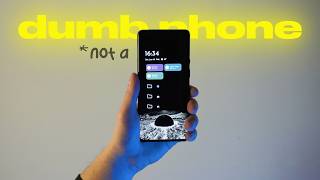
Niagara Launcher is the core of my minimalist phone setup because it strips away the clutter and keeps my home screen focused. It lets me pin only what I actually use, so my phone feels like a tool instead of an attention trap. I tested it for free and ended up using it as my daily driver.
Buy on Niagaralauncher
You'll be taken to Niagaralauncher to complete your purchase.
Pros
- +Minimal, distraction-reducing home screen
- +Easy access to favorite apps and folders
- +Helps prevent mindless app browsing
Cons
- -Less suited for people who want lots of widgets and customization layers
- -Some features may require a paid version
What Nik Sol says
“recently I see more and more people leing iPhones for old school bricks with buttons or deliberately daming down their smartphones I totally support it we all trying to escape the pressure of constant being online Fight for more and actually live in the present moment that's why I've set up my phone this way it's practical keeps me productive and still lets me stay connected without Go full monk mode I made this little piece of technology work for me not against me [Music] this is probably my most used Gadget ever but before we talk about the apps I have inside and the setup let's talk about the phone itself it's an old OnePlus 8 Pro from 2020 128 gigs of storage ip68 water and dust resistance and a powerful Snapdragon chipset the Sony camera sensor shoots in 4k and honestly this phone handled all my YouTube videos before I got a camera and I use it paired with this B unicorn 360 protection case because I'm ham-handed and drop my phone a lot this case is the only reason it is still alive but enough specs it's not a tech review let's go to see what's inside this phone runs Android which is rare in the world of people with iPhones at least on YouTube okay take it take it I'm sorry take it this is an iPhone what why would I steal an iPhone while owning a Mac and an iPad I still don't consider buying an iPhone as my main device in reality customizing an iPhone with those widgets and themes looks miserable to me it feels like you are painting a grass a different color first of all we all know it's green underneath the second the green was better and the second reason I'm not doing that is that you are constantly have to pay for good software it's not bad I was just raised in a Slavic country mentality and we are used to pay for software if you have open source but after saying that uh if I say I bought an app to set up my phone I will sound the most hypocritical person in the world but I did it well almost did in the Android world you can use launchers to customize your user experience when I knew about Niagara launcher I decided to test it cuz it was free and then I thought I would love it to have as my day daily driver for that I occasionally showed my wish list to my wife before the new year and that's how I got it for the lifetime what you see on the screen is the user interface I get after downloading a launcher it erases the app library from my view and my main screen allowing me to put either my favorite apps or folder with them on the home screen that's it and I got myself a cool anime inspired wallpaper that doesn't interfere with my icons on the screen just hit bright and light wallpaper papers bra I make the most out of such a minimal setup to my mind and I would love to show you what I have inside instead of tons of bulky widgets I have everything at the top of the screen including date time battery percentage and weather as well as my agenda which is connected to my Google Calendar the next thing I use daily is this widget which is provided by the app called tick tick it's a way I keep myself accountable regarding my habits as far as you can judge from this trick in here it helps and the main part is here there are folders with my most used apps I have 10 of them in total the first folder is my three main Google services Google Chrome YouTube music and Gmail I think everything here is pretty self-explanatory Google Chrome for the case I need to Google something real quick YouTube music is to listen to podcasts and listen to music during my training sessions and Gmail is to check my work and personal cars respondence even though I don't have much of it in the next folder I have my three main apps for communication with different people iy is a client of a telegram if you didn't know and I also have Viber and WhatsApp here Dam I wish I had only one app instead of those different messagers never mind and the last one is the most utilitarian folder here I have two of my most used tools a camera and a clock nothing too exciting and two apps for no taking Google keep is an app where I store my fleeting notes to-do lists quotes spontaneous thoughts Etc I cleaned all of them for the previous video where I did my digital decluttering so there is nothing much in here and here's notion which is mainly my second brain with all the knowledge I accumulate across multiple projects and areas of my life as far as you can see I don't have any social media apps whatsoever on my home screen and in most cases I just swipe up to manually search for the app I want to open this is very underrated move if you want to protect yourself from mindless opening app and starting the tomb scrolling now a speedrun through my most used apps I spread them across multiple folders just to show you I have six personal finance apps including crypto and normal banking I have a couple of apps dedicated to photo and video editing on my phone like cap cut and Lightroom I have language learning apps like fun easy learn and Quizlet and a couple of social networks including Facebook Instagram Tik Tok and Linkedin though I'm not using any of them for more than 10 to 20 minutes a day depending on the occasion among on something worth mentioning it's O relax an app for meditation a very cool one by the way and my reading app called Moon Reader where I read all my books and the pocket app I use to save cool articles I want to read later that's pretty much it let me know if you would choose my setup you have your own cool one or if you are from Apple cult I listen and I don't judge please support this video with your like and my Channel with your subscription if you want to see more content like this thanks for your attention it was Nick and I hope to see you the next time cheers”