
How I Install Arch Linux (the hard way).
🛍️ Products Mentioned (5)
Installing Arch is no easy feat, and adding full disk encryption can be overwhelming for many beginners. In this video, I walk you through how I install Arch from scratch, with full disk encryption. Installation Guide: https://github.com/dreamsofautonomy/arch-from-scratch Hardware Links: Beelink SE6 Max: https://amzn.to/48FJvA8 4TB SDD: https://amzn.to/48FJsUY Watt Meter: https://amzn.to/3TVnU27 Tool Kit: https://amzn.to/3vzJwY4 These are Amazon affiliate links which provide a small commission to this channel via anything purchased via these links 00:00:00 Introduction 00:00:22 Checking out our hardware 00:01:32 Download the installer 00:02:16 Verify installer Image 00:02:47 Flashing installer to usb 00:03:58 Setting up ssh 00:05:05 Partitioning disks 00:08:13 Adding full disk encryption 00:09:15 Setting up our volumes 00:10:16 Setting up our filesystems 00:10:57 Mounting our disks 00:11:36 Installing Arch! 00:12:45 Decryption on boot 00:13:29 Installing our bootloader 00:15:50 Adding home partition to decryption table 00:16:42 Setting up the clock and NTP 00:17:22 Adding Locale information 00:17:57 Adding a hostname 00:18:10 Setting up users 00:18:53 Sudo access 00:19:19 Installing Network Manager 00:19:35 Adding Gnome Desktop Environment 00:20:13 Installing Microcode 00:20:40 Reboot into our new system
🎬 More from Dreams of Autonomy

I found the most "a-peeling" Linux customization of all time.
27.9K views

Nix is my favorite package manager to use on macOS
279.8K views

This homelab setup is my favorite one yet.
750.7K views

We may have killed p10k, so I found the perfect replacement.
335.0K views

This Zsh config is perhaps my favorite one yet.
528.6K views
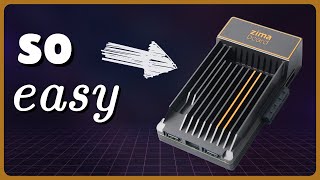
The Zimaboard is perhaps the most simple way to get started with a home server
25.7K views