
Stop This VSX-821 Mistake! Reset It Now + Pioneer VSX-821 factory reset, longevity tips
🛍️ Products Mentioned (1)
In this video, I demonstrate how to reset a Pioneer Receiver Model VSX-821 to factory settings. These receivers should be showing up at your local thrift store or charity shop as of June 2018 as people upgrade to newer models supporting 4K. Also you can increase the longevity of all your plug-in electronics with just one cool trick! My XR10X Sharp Projector has worked way beyond its life expectancy using this technique. TP Link Switch Link: https://amzn.to/2KmgIsP How to reset a VSX-1020: Switch the receiver into standby mode by holding down "Band" and then pressing and holding the "Standby/On" button for about two seconds. When you see "Reset?" appear on the display, press either the left or right arrow button or the "Auto Surround/Stream Direct" button until "OK?" is displayed. Follow databits: Facebook http://www.facebook.com/1databits Twitter: https://twitter.com/digitalbt or @digitalbt Heads up: This description contains an affiliate link. If you buy something through one of the links, you won't pay a penny more, but databits will get a small commission, which helps support this channel. Thank you!
🎬 More from databits

This TinyVinyl Record on a Crosley RSD3 Sounds Insane! TinyVinyl record sound test vinyl playback
2.8K views
These Tiny Records Actually Play?! 4K tinyvinyl on Crosley RSD3 Record Player
3.0K views
Sony Betamax Repair: Can This Dead VCR Play Again?! Plus MD
2.1K views
This VCR Setup Still Rules?! Video8 EV-C25 + Beta SL-HF600 Video Cassette Recorders
2.3K views
This Secret Trick Loads Online Games on the CoCo! TRS-80 Color Computer retro coding tutorial
1.4K views
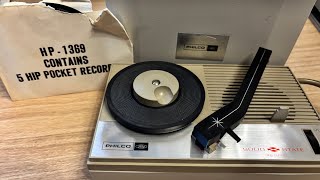
This 60s "Hip Pocket" Record Player Still Works?! Philco Ford portable record player test
5.8K views