
How to Make a Gmail Agent with n8n – Auto Replies & Auto Labeling
🛍️ Products Mentioned (2)
🌟 Get your FREE n8n GMAIL Agent template 👇🏼 https://jakariarakin.gumroad.com/l/ifgnsn Gmail automation | N8N automation | Business automation In this tutorial, I’ll show you how to build a fully automated AI-powered Gmail agent using N8N – no coding required! This workflow will automatically label incoming emails and draft smart replies, saving you time and boosting productivity. 🔹 How It Works: ✅ Detect Incoming Emails – N8N watches for new Gmail messages. ✅ Auto-Label Emails – Assigns labels based on sender, keywords, or urgency. ✅ AI-Generated Draft Replies – Creates smart response drafts instantly. ✅ Full Automation – No manual sorting or replying needed! This is a must-have automation for freelancers, entrepreneurs, and anyone looking to streamline their email workflow for free! 🔥 Watch now and start automating! 🔥 🔗 Useful Links: 🔹 N8N – www.n8n.io 🔹 Gmail API Setup Guide (if needed) – developers.google.com/gmail/api 🔹 Open Router (for get access to free Ai Models) – https://openrouter.ai/ 🔹 Follow me for more automation tips! 👇 📺 YouTube: https://youtube.com/@RakinJakaria 📸 Instagram: www.instagram.com/rakinjakaria 🐦 Twitter: www.x.com/@rakinjakaria 📩 Business Inquiries: rakinjakaria@gmail.com #businessautomation #n8n #gmailagent
🎬 More from Rakin Jakaria
Claude + Higgsfield Canvas — Create Insane Video Ads Consistently
7 views

This AI Automation Uploads Videos Automatically on My Social Media (Claude + Seedance 2.0)
52 views
The Easiest Way to Make AI Video Ads in 2026 (Higgsfield)
253 views

Claude + Higgsfield. Insane Video Ads in Minutes.
331 views
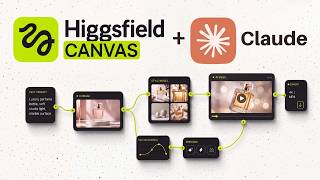
I Automated Video Ads With Claude + Higgsfield Canvas (No Editing Needed)
1.1K views

Unlimited Video Ads On Autopilot (Claude + Higgsfield MCP)
1.1K views