
How to Install NextCloud In Docker on Ugreen NAS (Step-by-Step Guide)
🛍️ Products Mentioned (9)
the Docker Compose Code here
List of Time Zones
Download NextCloud Client Apps
Ugreen DXP4800 Plus
Ugreen DXP4800 Pro
Western Digital 6TB WD Red Plus NAS
Western Digital 12TB WD Red Plus NAS
Seagate IronWolf 8TB NAS Internal Hard Drive
Seagate IronWolf 12TB NAS Internal Hard Drive
Looking for a powerful, self-hosted alternative to Google Drive or Dropbox? In today’s video, I’ll walk you through the step-by-step process of installing NextCloud on your Ugreen NAS using Docker. NextCloud is an incredible tool for file syncing, note-taking, and private cloud management. I’ve moved my entire setup to the Ugreen NAS to take advantage of higher network speeds and centralize my home lab. Whether you are a beginner or a home lab enthusiast, this tutorial will help you get your private cloud up and running in minutes. 🚀 Get the Docker Compose Code here: https://github.com/mikefauytube/Video-Support-Files/blob/main/Docker%20Compose%20for%20NextCloud%20New.txt 🌍 List of Time Zones: https://en.wikipedia.org/wiki/List_of_tz_database_time_zones 💻 Download NextCloud Client Apps: https://nextcloud.com The links below are Amazon Affiliate links. As an affiliate, I earn a small commission from your purchases without affecting your price. Thank you for your continued support of the channel. Ugreen DXP4800 Plus: https://amzn.to/4bzHqIS Ugreen DXP4800 Pro: https://amzn.to/4uHvEVu Hard Drives Western Digital 6TB WD Red Plus NAS: https://amzn.to/45uCPnV Western Digital 12TB WD Red Plus NAS: https://amzn.to/4epaWBI Seagate IronWolf 8TB NAS Internal Hard Drive: https://amzn.to/3RU6Gkf Seagate IronWolf 12TB NAS Internal Hard Drive: https://amzn.to/3xo1qy6 In this video, we cover: ✅ Preparing your Ugreen NAS Docker environment. ✅ Creating the necessary folder structures (Config, Data, DB, Redis). ✅ Configuring the Docker Compose file (MariaDB, Redis, and App settings). ✅ Critical security tips for passwords and database management. ✅ Optimizing performance with CRON vs. AJAX settings. ✅ Setting up the NextCloud client for file syncing. #NextCloud #UgreenNAS #Docker #HomeLab #NAS #TechTutorial
🎬 More from Mike Faucher

Reolink TrackFlex Floodlight: Review — 4K PTZ, Dual Lens, AI Tracking & More
186 views

Travel Tech - My Top Picks for Travel and Cruises
658 views
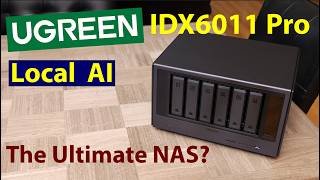
UGREEN AI NAS iDX6011 Pro Review: The Ultimate AI Home Lab?
1.8K views

Terramaster F2-425-The Best Budget Media Server For Plex or JellyFin?
1.9K views

TP-Link BE3600 (TL-WR5602BE) Wi-Fi 7 Travel Router Review & Benchmarks
1.4K views

Orico X50 Thunderbolt 5 NVMe SSD Enclosure Review
528 views