
Corsair iCUE 5 Ultimate Guide 2026: Mastering iCUE 5 in just one video.
🎥 Join the Channel for Exclusive Perks & Behind-the-Scenes Access: 👉 https://www.youtube.com/channel/UCOMM04eKP5AeWyd8YDlLT-A/join This guide walks Beginners to tech-savvy users through setting up and mastering iCUE 5.38.86 on Windows, covering everything from device detection, RGB lighting, and fan curves to macros, profiles, and Murals. It includes detailed tips and detailed customization workflows for all iCUE compatible hardware to create a fully optimized and personalized Corsair ecosystem. If you care about speed, privacy, and not getting tracked, NordVPN is the VPN that actually delivers. ➡️ https://go.nordvpn.net/SHAby Timestamps: 00:00 – iCUE 5 Overview 01:13 – First Launch Setup 02:06 – Welcome to iCUE 03:08 – Firmware Updates (Must Do) 04:08 – Close Other RGB Software 04:27 – Why Firmware Matters 04:49 – Lighting Setup Basics 05:13 – Lighting Channels 05:51 – Organizing RGB 06:40 – System Hub Setup 06:57 – First-Time AIO & RAM Setup 07:26 – RAM Not Detected Fix 07:38 – Device Settings Explained 08:54 – Required iCUE Services 09:05 – Start iCUE with Windows 09:28 – Lighting Layers & Order 10:49 – Lighting Link Explained 11:23 – Per-Device vs Linked 12:11 – Hardware vs Software Lighting 13:12 – Lighting Troubleshooting 13:59 – AIO Cooling Profiles 14:15 – Preset Cooling Modes 15:11 – Custom Fan Curves 15:47 – Best AIO Temp Sources 16:31 – Creating Fan Curve Points 17:01 – Assigning Fans Correctly 17:31 – Fan Profiles by Temps 17:46 – AIO Pump Settings 18:12 – Testing Fan Curves 19:22 – 0 RPM Fan Mode 19:58 – Mapping Keys to Cooling 20:17 – Creating Profiles 22:12 – Switching & Default Profiles 23:05 – Profile Organization 24:07 – Profile Persistence 25:18 – Import, Export & Backups 26:18 – Macros & Key Mapping 29:07 – Launching Apps & Actions 30:31 – Device Memory Options 32:40 – Lighting Link vs Murals 34:21 – Creating Murals 36:58 – Full RGB Themes 37:38 – Final Organization Tips --- 💻 AM5 Budget Build 2025 9600X ➡️ https://geni.us/63xRf TUF B850 ➡️ https://geni.us/AO8DZ LC 360 ARGB LCD ➡️ https://howl.link/zyfzo7lonnvjd Corsair DDR5 32 GB ➡️ https://howl.link/bdxlnq3o7yzol Crucial P3 Plus ➡️ https://geni.us/xilclS0 Montech Air 903 Max ➡️ https://geni.us/KywN1 RX 9070 Nitro+ ➡️ https://geni.us/TfHSB8C Seasonic PX-1000 ➡️ https://geni.us/DxB566 --- ⚡ Gaming PC Build 2024 9800X3D ➡️ https://geni.us/hqjnRyp Crosshair X870E Hero ➡️ https://geni.us/OE1lsHx Trident Z5 DDR5 ➡️ https://geni.us/uR1z93 Ryujin III ➡️ https://geni.us/yqAI1lQ RTX 4090 ➡️ https://geni.us/RP5V AORUS Gen5 SSD ➡️ https://geni.us/cc4OFL iCUE 6500X ➡️ https://geni.us/n9OG Corsair QX Fans ➡️ https://geni.us/2V5AzSp MSI 1000 W PSU ➡️ https://geni.us/6azc ROG 34" OLED ➡️ https://geni.us/sRjhuLA LG 34GP950G-B ➡️ https://geni.us/WZeANf K100 RGB Keyboard ➡️ https://geni.us/rIvgS G502 X2 Mouse ➡️ https://geni.us/5253LX --- 🧰 Tools & Supplies Arctic Silver 5 ➡️ https://geni.us/Oy8UQ2 iFixit Kit ➡️ https://geni.us/Bb1Er Precision Driver ➡️ https://amzn.to/3AVkfKH Coffee Filters ➡️ https://amzn.to/4fBQQV5 Microfiber Cloth ➡️ https://amzn.to/3CDmQtt Rubbing Alcohol ➡️ https://amzn.to/3AKhDzr --- 🎮 VPN for Gaming (3 Months Free!) https://www.expressvpn.com/chrismizo --- 🎬 Camera Gear Sony A7S III ➡️ https://geni.us/Dm9c Sony FE 24 mm ➡️ https://geni.us/vFXJe Memory Card ➡️ https://geni.us/IXhIPci Battery ➡️ https://geni.us/P1pfFf Tripod ➡️ https://geni.us/waQw VideoMic Pro ➡️ https://geni.us/xB2sG Mic Stand ➡️ https://geni.us/k2HVE Lights ➡️ https://geni.us/AsYl Stabilizer ➡️ https://geni.us/VTcrL5 --- 🎵 Music StreamBeats by Harris Heller ➡️ https://www.youtube.com/channel/UCQ6hCusHlsIDXqoTbbTHSUQ --- 🌐 All Links & Contact: https://www.chrismizo.com ☕ Support: https://buymeacoffee.com/chrismizo 👥 Join the Fam Bam: https://bit.ly/2FqjZT9 💬 Discord: https://discord.gg/gF3H5Qbu9z 🐦 X: https://x.com/MizoChris
🎬 More from Chris Mizo
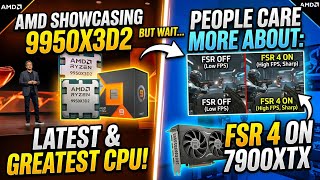
🚨 AMD Just Dropped 9950X3D2… But Everyone Only Cares About FSR 4?!
167 views

🔥 Live PC Parts Hunt at MicroCenter! Best Deals & Budget for a PC Gamer 🔥
633 views
🚨PC Market Is Getting Weird… FREE Intel 285K with RAM?! | Intel 270K Dropping soon! Hardware AMA
497 views
📱🚨PC Market Is Getting Weird… FREE Intel 285K with RAM?! | Intel 270K Dropping soon! Hardware AMA
394 views
🚨 Don’t Buy a GPU in 2026 Until You Watch This
2.3K views

🚨 DLSS 5 EXPOSED… This Isn’t What NVIDIA Told You
693 views